One plan. $99 a month.
Everything Joe does, for one business.
A scheduler posts what you write. Joe writes it, shows it to you, and posts it when you say yes.
Pay by card. Cancel any time. No refunds.
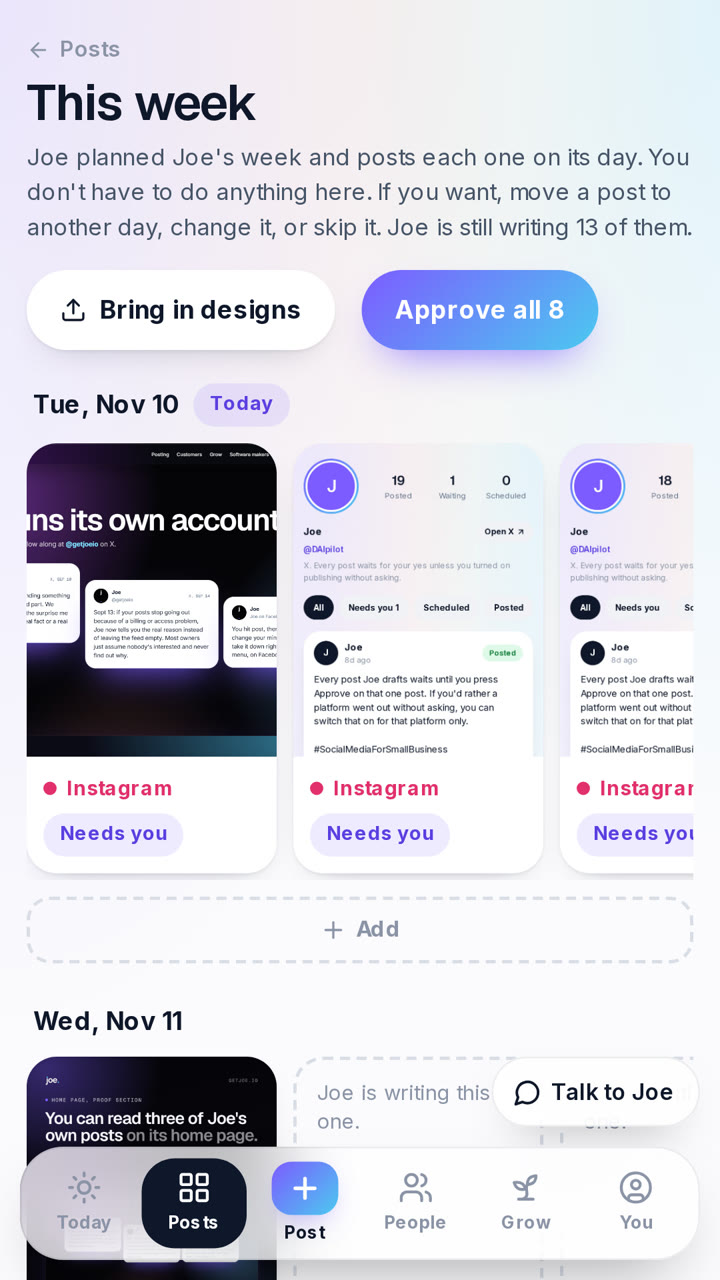
How starting works
- Pay $99 with a card on Stripe's checkout page. Joe never sees your card.
- Sign in to Joe with the Google account that uses the same email.
- Connect your accounts and tell Joe about your business, or let it read your website.
No refunds. Cancel any time.
Everything that is included
- Drafts every posting day for Facebook, Instagram, X and LinkedIn, each written for its platform
- Your photos and short videos turned into posts, Reels and Stories
- Send Joe a photo, get a post back
- The weekly note that steers the week
- People: every reply and lead on one list
- Finding customers: research, first messages, follow-ups by Facebook message
- Reply drafts for Reddit, Facebook groups and Nextdoor, which you post yourself
- Google review thank-yous and review requests
- A monthly newsletter, approved word for word
- Ad pictures for Facebook and Instagram, including video, yours to download
- Launch week for a brand new business
- Photo booth and camera box for venues
- Posts from your GitHub repo, for software makers
Where does Joe post, and how does it connect?
You connect each account on that network's own sign-in screen. Tap a row to see what Joe does there, how you connect, and the limits.
Joe posts here
Facebook PagePosts for you
- What Joe does
- Posts your approved posts, photos, videos and Stories to the Page you pick.
- How you connect
- Tap Connect Facebook. Facebook's own screen opens and you tick the Page. No password goes to Joe.
- Limits
- You need a Page you manage. Today Joe does not read comments, show post numbers or place ads on your account.
InstagramPosts for you
- What Joe does
- Posts your approved photos, Reels and Stories. Every video goes out as a Reel.
- How you connect
- The same Facebook screen. There is no separate Instagram sign-in.
- Limits
- Your Instagram must be a professional account linked to your Facebook Page.
XPosts, with limits
- What Joe does
- Posts your approved posts, with a picture or a video, from your own X account.
- How you connect
- Tap Connect X and say yes on X's own screen.
- Limits
- Joe only posts on X. It does not read replies or mentions there.
LinkedInPosts, with limits
- What Joe does
- Posts your approved words and pictures to your own LinkedIn profile.
- How you connect
- LinkedIn's own sign-in screen.
- Limits
- Your personal profile only, not a company Page. No video. LinkedIn asks you to connect again about every 60 days.
Joe learns your business from
Your websiteReads only
- What Joe does
- Reads your public website for facts about the business, and reads it again each week.
- How you connect
- Type the address. There is nothing to sign in to.
- Limits
- Joe reads only pages anyone can see.
Your photos and clipsYou send them
- What Joe does
- Keeps your photos and clips in a library and makes posts from them.
- How you connect
- Add them in the app, share them from an Android phone, or set up a Shortcut on an iPhone.
- Limits
- The iPhone Shortcut is a one time setup you do yourself. You cannot email or text pictures in.
Designs and videos you already madeYou upload
- What Joe does
- Lines up finished posts and videos you made yourself and posts the next one each day.
- How you connect
- On the Line them up screen, upload PNG or JPG pictures, or MP4 and MOV videos exported from Muse, CapCut, Zeely or any editing app.
- Limits
- This is a file upload. Those apps have no connection Joe can plug into, so you export the video and add it.
GitHub, for software makersReads only
- What Joe does
- Reads the repos you pick for real facts about what you shipped.
- How you connect
- Tap Connect GitHub. GitHub's own install screen opens and you choose the repos.
- Limits
- Read-only. Access lasts one hour at a time and you can remove Joe on GitHub. Real product screenshots need one more step: a workflow file you add to your repo.
Signing in, paying and extras
Google sign-inSign-in only
- What Joe does
- Signs you in to Joe. That is all it is used for.
- How you connect
- Tap Sign in with Google.
- Limits
- Sign-in opens once you have paid, with the same Google email. Joe has no password of its own.
StripePayment only
- What Joe does
- Takes the $99 a month on Stripe's own checkout page.
- How you connect
- Tap Start and pay with a card.
- Limits
- Joe never sees your card number. To change or cancel, open Billing in the app, which sends us an email today.
GmailSends, with limits
- What Joe does
- Sends the review requests and the monthly newsletter you approved, from your own Gmail.
- How you connect
- Google's own screen asks for permission to send only.
- Limits
- Up to 10 review requests and 50 newsletter emails a day. Joe cannot read your inbox or your replies.
ClaudeDrafts only
- What Joe does
- Lets Claude read your business facts and photos in Joe and add drafts.
- How you connect
- In Claude, add a custom connector with the address https://getjoe.io/api/mcp, then tap Allow on Joe's own screen.
- Limits
- Claude cannot approve, schedule or post. You add it by hand. It is not listed in Claude's directory.
For Google reviews, Reddit, Facebook groups and Nextdoor, Joe writes the reply and you post it yourself.
Not connected today: TikTok, Canva, Google Business Profile, LinkedIn company Pages, YouTube, Threads and Pinterest.
What else do owners ask?
Will Joe post something I have not seen?
No. Every post waits for your yes.
Will it sound like AI?
Joe writes from what you tell it, your website and your own photos, and you can change any post before it goes out. Joe's own posts are on the home page. Read them and judge for yourself.
How much of my time does it take?
You read the posts that are waiting and tap Approve on each one, or change it first. That is the daily job.
Is it legit with Facebook and Instagram?
You connect on Facebook's own sign-in screen and pick your Page. Joe never asks for or stores a password.
What do I need to start?
A card, a Google account, and somewhere to post: a Facebook Page you manage, an X account or a LinkedIn profile. Instagram needs a professional account linked to your Facebook Page.
What happens if I cancel?
Cancel any time. There are no refunds. Posts that already went out stay where they are. To cancel, open Billing in the app, which sends us an email.
How do I reach a person?
Email hello@getjoe.io.
Joe writes it. You say yes. Joe posts it.
Pay by card. Cancel any time. No refunds.
Questions first? Email hello@getjoe.io.